

When a service business wants more leads, the first instinct is usually to spend more on ads. That can work for a while, but it also hides a more expensive problem: the website may already be wasting the traffic it receives.
If a local contractor, consultant, clinic, agency, or home service company pays for visitors but loses them to vague messaging, slow mobile pages, weak calls to action, poor tracking, or delayed follow-up, the business is not facing only a traffic problem. It is facing a conversion system problem.
The more sustainable path is to increase the yield of existing traffic before increasing acquisition costs. A website should act like a fast, structured, measurable lead generation system. That system needs clear conversion architecture, technical SEO, Core Web Vitals discipline, trustworthy content, accurate attribution, and automated speed-to-lead workflows.
This guide explains how to get more leads from your website without simply increasing ad spend.
What the Problem Really Means for a Business
A website with stagnant conversion rates becomes more expensive over time. Paid search costs rise, competitors bid on the same keywords, directory placements get crowded, and organic results become harder to earn. If the website does not convert visitors efficiently, customer acquisition cost rises even when traffic looks healthy.
This is the classic leaking bucket. More visitors enter the site, but too many leave before calling, booking, or submitting a form.
The leaks usually come from several small points of friction:
- The hero section does not clearly say what the business does, who it helps, or where it works.
- The primary call to action is buried, generic, or visually weak.
- Service pages read like brochures instead of answering high-intent buying questions.
- Forms ask for too much information too early.
- Mobile menus, chat widgets, or booking embeds feel slow.
- Reviews and proof are separated from the exact moment when the visitor is deciding whether to trust the business.
- Tracking cannot connect the lead back to the page, query, campaign, or location that produced it.
- The business responds hours later, after the prospect has contacted competitors.
For service businesses, the last point is brutal. The moment after a prospect submits a form or requests a quote is the moment of peak intent. They have a problem, they are actively comparing options, and they are willing to talk. Every minute of delay reduces the chance of reaching, qualifying, and closing that lead.
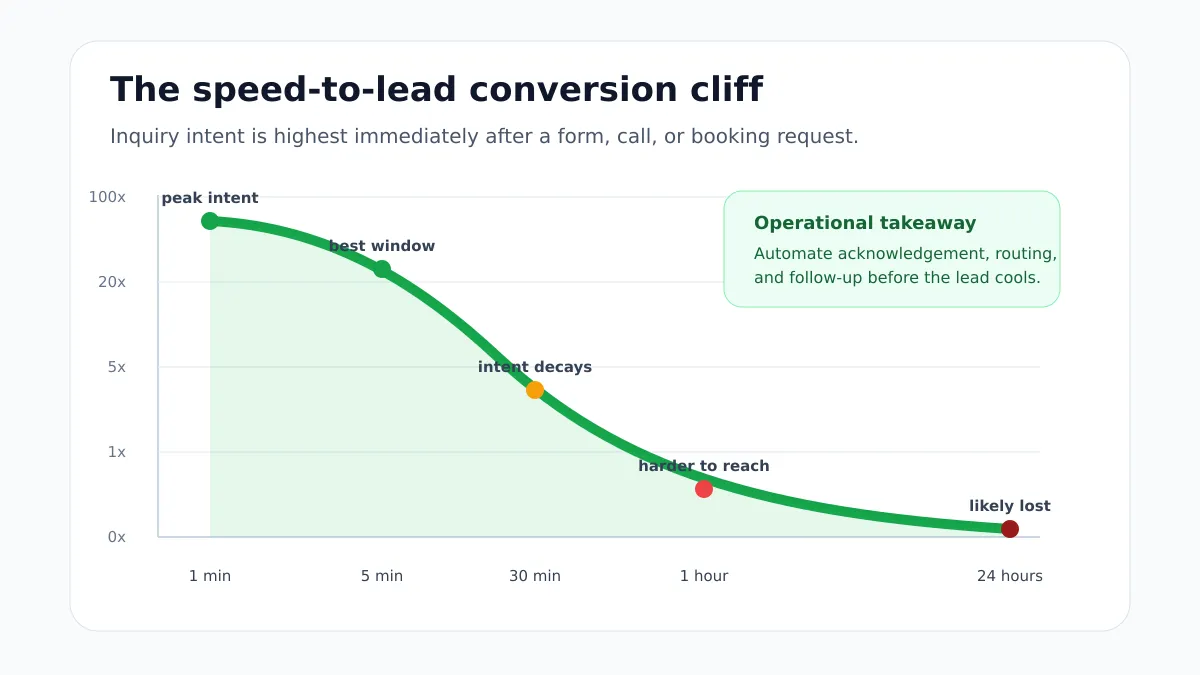
A better website is not just prettier. It changes the economics of the business by helping the same traffic produce more calls, quote requests, consultations, and booked appointments.
Why Most Businesses Get This Wrong
Many websites are still treated like digital brochures. The goal becomes to look professional, list services, and provide contact information. That is not enough anymore.
A lead generation website has a different job. It has to guide a visitor from problem recognition to trust to action with very little wasted attention.
The most common strategic mistakes are simple but costly.
First, businesses over-invest in traffic before fixing the destination. A Google Ads campaign, Facebook campaign, or local directory listing can produce clicks, but those clicks are expensive if the landing page does not match the search intent.
Second, website work, SEO, ads, and sales follow-up are treated as separate projects. The ad agency sends traffic. The web designer controls the layout. The admin team checks email when they can. The CRM is updated manually. Nobody owns the full path from search query to booked appointment.
Third, many sites use company-centered copy instead of buyer-centered copy. Visitors do not arrive thinking, “Tell me your company story.” They arrive thinking, “Can you solve my problem, are you trustworthy, do you serve my area, and what happens if I contact you?”
Fourth, tracking is often too shallow. A business may know total sessions and form submissions, but not which service page created qualified leads, which location page drove calls, which campaign created spam, or which lead source produced booked revenue.
That disconnect makes it easy to spend more and learn less.
How to Diagnose the Lead Generation Bottleneck
Before redesigning pages or changing ad budgets, diagnose where the conversion system is leaking.
Start with behavioral evidence. Analytics can show page views and conversions, but session recordings and heatmaps reveal where users hesitate, scroll, rage click, abandon forms, or miss calls to action. If most users leave before reaching proof, pricing context, or the contact section, the page structure is likely wrong.
Then audit search and technical visibility. A persuasive service page cannot generate leads if it is not crawlable, indexable, internally linked, or aligned with search intent. Check Search Console, sitemap inclusion, canonical tags, internal links, schema, title tags, and mobile usability.
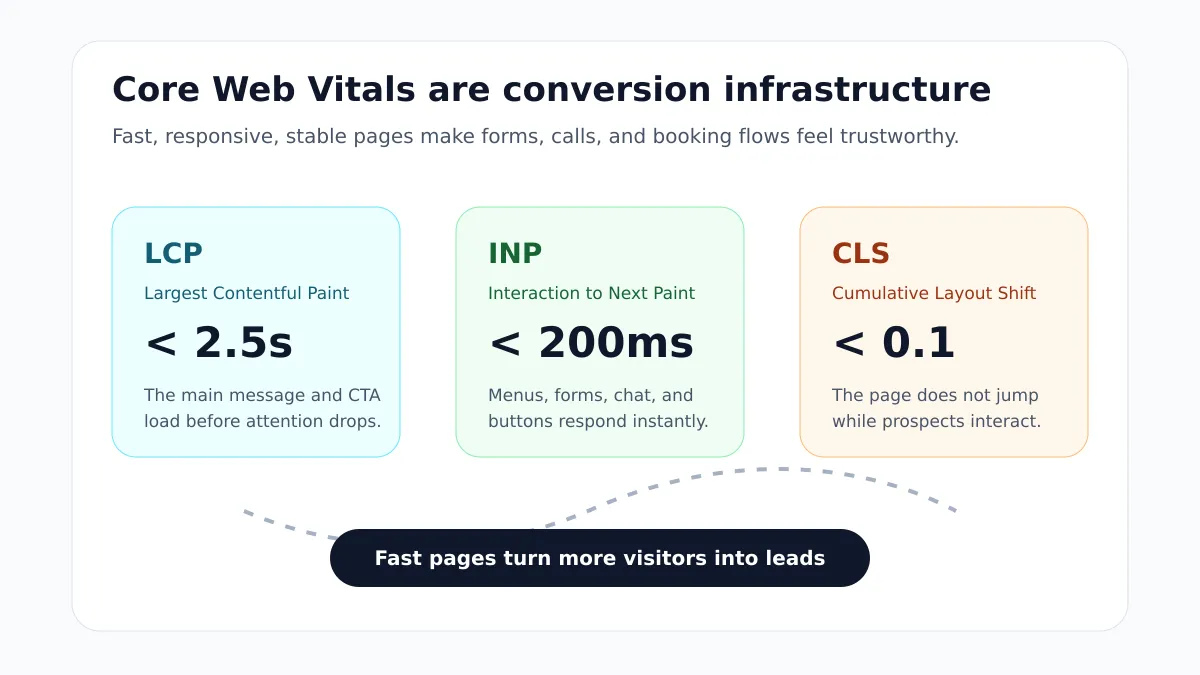
Next, measure Core Web Vitals and real interaction quality. Do not only test desktop load speed on a strong connection. Service buyers often browse on mobile devices while multitasking. A phone CTA that reacts slowly, a form that shifts while typing, or a booking widget that blocks the main thread can suppress leads without showing as an obvious visual defect.
Finally, compare website timestamps with CRM timestamps. For every form submission, quote request, call request, and booking inquiry, ask:
- How quickly did the business acknowledge the lead?
- How quickly did a human or automation attempt the first real follow-up?
- Was the lead assigned to the right person?
- Was the source captured accurately?
- Did the CRM record the next step?
- Did the lead become a booked consultation, estimate, sale, or lost opportunity?
If the site produces inquiries but follow-up takes hours, the priority is not another homepage redesign. The priority is speed-to-lead automation.
What to Fix First
The fastest gains usually come from fixing the highest-friction conversion points first.
Clarify the Hero Section
The first screen should answer four questions quickly:
- What do you do?
- Who do you help?
- Where do you serve?
- What should I do next?
A strong hero section uses a direct headline, a specific supporting sentence, a primary call to action, and immediate proof. Avoid clever language that makes the visitor work too hard. If someone cannot understand the offer in five seconds, the page is carrying unnecessary risk.
For a service business, compare these two approaches:
| Weak hero copy | Stronger hero copy |
|---|---|
| We create digital experiences for modern brands. | Website development, SEO, and AI automation for service businesses that need more qualified leads. |
| Contact us today. | Book a conversion review for your website. |
| We are passionate about innovation. | Faster pages, clearer service funnels, better tracking, and automated follow-up. |
Specificity wins because it reduces uncertainty.
Make the Primary Action Obvious
Every revenue page should have one dominant next step. That may be booking a consultation, requesting a quote, calling the office, starting an audit, or submitting a project brief.
The CTA should appear above the fold, after major proof sections, near pricing or process context, and at the end of the page. On mobile, critical contact actions should remain easy to reach without forcing the user to scroll back to the top.
The goal is not to make the site aggressive. The goal is to make the next step effortless.
Reduce Form Friction
Lead forms should request only what is necessary to begin the conversation. Long forms can work for high-ticket qualification, but they should earn that complexity with context.
For many service businesses, a first-step form can ask for:
- Name.
- Email or phone.
- Service needed.
- Location or service area.
- A short message.
Use the right mobile input types, clear labels, visible error states, and confirmation messages. If the form submits successfully, the visitor should know what happens next and when to expect a response.
Move Trust Signals Into the Decision Path
Reviews, badges, case studies, certifications, screenshots, client outcomes, and before-and-after proof should not live only on separate pages. They should appear near the points where the visitor is deciding whether to act.
Place trust signals near:
- Hero CTAs.
- Service descriptions.
- Pricing or package explanations.
- Contact forms.
- Booking sections.
- Comparison sections.
- Local landing page intros.
Trust is not decoration. It is conversion infrastructure.
Technical SEO Considerations
Technical SEO supports lead generation by making sure search engines and AI systems can discover, render, understand, and rank the pages that actually drive revenue.
A service business should start with crawlability and indexation. Revenue pages should be present in XML sitemaps, internally linked from relevant sections, self-canonicalized, and free from accidental noindex directives or robots.txt blocks.
Next, strengthen the information architecture. Search engines need clear relationships between core service pages, location pages, blog articles, case studies, and contact paths. Internal links should help both crawlers and users understand which pages are most important.
Structured data also matters. Use schema that matches visible page content:
| Page type | Recommended schema role |
|---|---|
| Homepage | Organization, WebSite, LocalBusiness or ProfessionalService when appropriate |
| Service page | Service, Offer, FAQPage when FAQs are visible |
| Location page | LocalBusiness, Place, BreadcrumbList, localized service references |
| Blog article | BlogPosting or Article, FAQPage when FAQs are visible, BreadcrumbList |
| Contact or booking page | ContactPage, potentialAction, relevant business entity references |
Avoid dumping the same generic schema on every page. A service page, article, and location page should not all tell search engines the exact same thing. Each page needs structured data that matches its unique role.
For AI search and answer engines, clarity is even more important. Retrieval systems favor content that is easy to parse, entity-rich, internally linked, and written in direct answer formats. A page that clearly defines services, locations, processes, proof, FAQs, and next steps has a better chance of being understood by both search crawlers and AI systems.
Website Development Considerations
Lead generation depends on performance, accessibility, and interaction quality.
Largest Contentful Paint affects whether the main message appears quickly enough for the visitor to stay. Interaction to Next Paint affects whether clicks, taps, menus, forms, and widgets feel responsive. Cumulative Layout Shift affects whether the page feels stable and trustworthy while loading.
Development decisions that commonly hurt leads include:
- Heavy JavaScript bundles for simple marketing pages.
- Large unoptimized images in the hero section.
- Third-party scripts loading before critical content.
- Chat, booking, or review widgets blocking the main thread.
- Layouts that shift when fonts, images, ads, or embeds load.
- Forms without accessible labels or usable mobile states.
- Important content rendered only after client-side JavaScript runs.
For service businesses, a modern stack should prioritize fast HTML, optimized images, lightweight interactivity, reliable forms, and progressive enhancement. The visitor should be able to understand the offer and start a lead action even before every non-critical enhancement has loaded.
Tracking and Analytics Considerations
You cannot scale what you cannot measure.
Basic analytics can show that someone submitted a form, but a serious lead generation system should capture the full path:
- Landing page.
- Traffic source.
- Search query or campaign when available.
- Service interest.
- Location or service area.
- Form completion or call action.
- CRM lead creation.
- First response time.
- Qualification status.
- Booked appointment or closed deal.
Browser-only tracking is increasingly fragile because of privacy controls, ad blockers, cookie limits, and client-side script failures. Server-side tracking can improve reliability by sending events from a first-party server to analytics, ad platforms, and CRM systems.
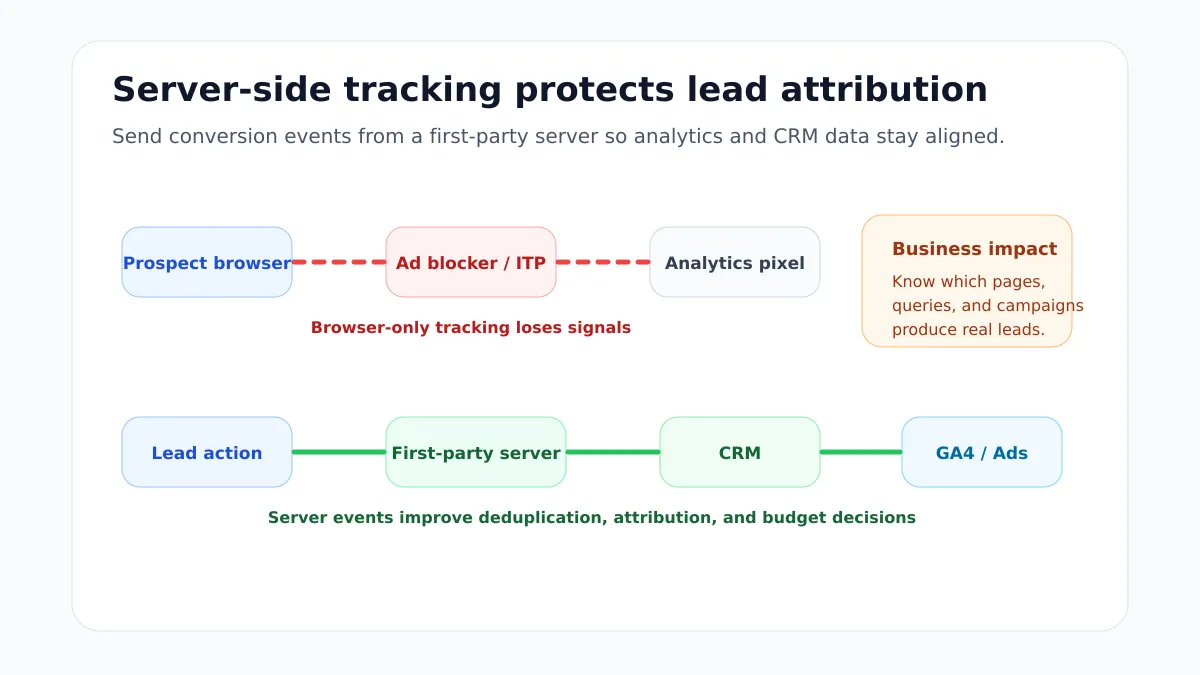
This does not mean collecting unnecessary personal data. It means building a privacy-conscious measurement system that helps the business understand which pages and channels produce qualified leads.
The practical result is better decision-making. Instead of asking, “Did traffic go up?” the business can ask, “Which service pages created qualified opportunities this month, and which follow-up workflows turned those opportunities into revenue?”
AI Automation and Speed-to-Lead
AI automation is not just a chatbot in the corner of the screen. For lead generation, the most valuable automation often happens after the visitor takes action.
A strong speed-to-lead workflow can:
- Send an instant confirmation to the prospect.
- Create or update the CRM record.
- Enrich the lead with service, location, and source data.
- Route the lead to the right person or pipeline.
- Trigger SMS, email, or AI voice follow-up when appropriate.
- Notify the team in Slack, email, or the CRM.
- Score the lead based on urgency, budget, location, or service fit.
- Schedule a reminder if the first response is missed.
This is where website development, AI automation, and CRM operations need to work together. The form cannot be an isolated inbox. It should be the entry point into a measured pipeline.
For many local service businesses, the biggest improvement is simple: never let an inbound lead sit unnoticed.
How I Would Approach This for a Service Business
For a service business, I would not start by asking only how the homepage should look. I would map the revenue path first.
That means identifying the highest-value services, the most important locations, the buyer questions that block action, and the exact lead events that need to be tracked. From there, the website can be structured around conversion paths instead of generic pages.
The practical implementation usually looks like this:
- Audit search visibility, technical SEO, Core Web Vitals, analytics, forms, and CRM follow-up.
- Identify the most valuable service and location pages to strengthen first.
- Rewrite above-the-fold messaging around the visitor’s problem and the business outcome.
- Add stronger CTAs, proof, FAQs, and trust signals where visitors decide.
- Improve mobile performance, image loading, JavaScript behavior, accessibility, and form usability.
- Add structured data that matches each page type and visible content.
- Connect form, booking, phone, and CRM events to analytics and attribution.
- Add automation for instant acknowledgement, routing, qualification, and reminders.
- Review the data monthly and improve pages based on qualified lead outcomes, not vanity traffic.
This is the difference between a website redesign and a growth system. The redesign changes the surface. The system changes what happens when a qualified visitor arrives.
If you are evaluating your own site, start with the pages that already get impressions or traffic but do not produce enough inquiries. Those pages often offer the fastest return because the demand already exists.
Mistakes to Avoid
Do not increase ad spend before fixing the conversion path. More traffic will not solve unclear messaging, slow forms, weak proof, or poor follow-up.
Do not hide contact options. Visitors should not have to search for the phone number, booking link, or quote request path.
Do not treat mobile as a smaller desktop page. Mobile visitors need readable layouts, thumb-friendly CTAs, fast interactions, and short forms.
Do not rely only on a contact form that sends an email. Emails get missed. A serious lead system should create a tracked CRM record and trigger follow-up.
Do not use generic content across every service and location page. Thin pages weaken trust and make it harder for search engines to understand relevance.
Do not install every tracking, chat, review, and booking script without performance discipline. Third-party tools can help conversion, but they can also slow down the exact actions they are supposed to support.
Practical Checklist
Use this checklist to prioritize the work.
| Phase | Action | Success signal |
|---|---|---|
| Conversion architecture | Rewrite the hero section around the visitor’s problem, service, location, and next step | A visitor understands the offer within five seconds |
| Conversion architecture | Add clear CTAs above the fold, after proof, near forms, and at the end of the page | More CTA clicks and form starts |
| Trust | Place reviews, case studies, badges, and proof near decision points | Lower form abandonment and stronger engagement |
| Mobile UX | Simplify forms, improve tap targets, and keep key contact actions easy to reach | More mobile calls, bookings, and submissions |
| Performance | Improve LCP, INP, and CLS on revenue pages | Passing Core Web Vitals field data |
| Technical SEO | Check indexing, canonicals, sitemap inclusion, internal links, and schema | Revenue pages are crawlable, indexable, and internally supported |
| Tracking | Connect form, booking, call, CRM, and source data | Qualified leads can be traced to pages and channels |
| Automation | Route and acknowledge leads instantly | First response happens within minutes |
| Optimization | Review qualified lead outcomes monthly | Pages improve based on revenue quality, not only traffic volume |
Final Recommendation
The best way to get more leads from a website is not always to buy more traffic. It is often to make the existing traffic easier to convert, easier to measure, and faster to follow up with.
For service businesses, the website should be a conversion system: clear messaging, fast pages, useful service content, strong local and technical SEO, trustworthy proof, accurate attribution, and automated lead handling.
Once that system works, increasing ad spend becomes less risky because each additional visitor has a better chance of becoming a real opportunity.
If your website is getting traffic but not enough qualified inquiries, start with a conversion and tracking review before expanding the budget. You can explore the website development, SEO, and AI automation services, review the technical SEO audit approach, or book a consultation to map the highest-impact fixes for your site.
Works Cited
- What Is Speed to Lead?
- Speed to Lead: Respond to Leads Fast for Higher Conversions
- Speed-to-Lead Benchmarks 2026: The Data Behind Why Most Teams Lose Leads
- How To Set Up Server Side Tracking: Complete Guide
- GA4 Server Side Tracking Explained and Setup Guide
- How To Set Up Server-Side Tracking
- INP: The New Core Web Vitals Metric SEOs Should Know
- Hello INP: Everything You Need to Know About the Newest Core Web Vital
- How Do Core Web Vitals Impact Your Conversion Rates?
- Copy Our Proven Conversion Rate Optimization Checklist
- 53-Point CRO Checklist to Boost Your Sales Conversions
- AEO and GEO Optimization Guide
- Generative Engine Optimization Best Practices
- LocalBusiness Schema JSON-LD Guide and Examples
- Schema.org for Businesses: A Practical Implementation Guide