
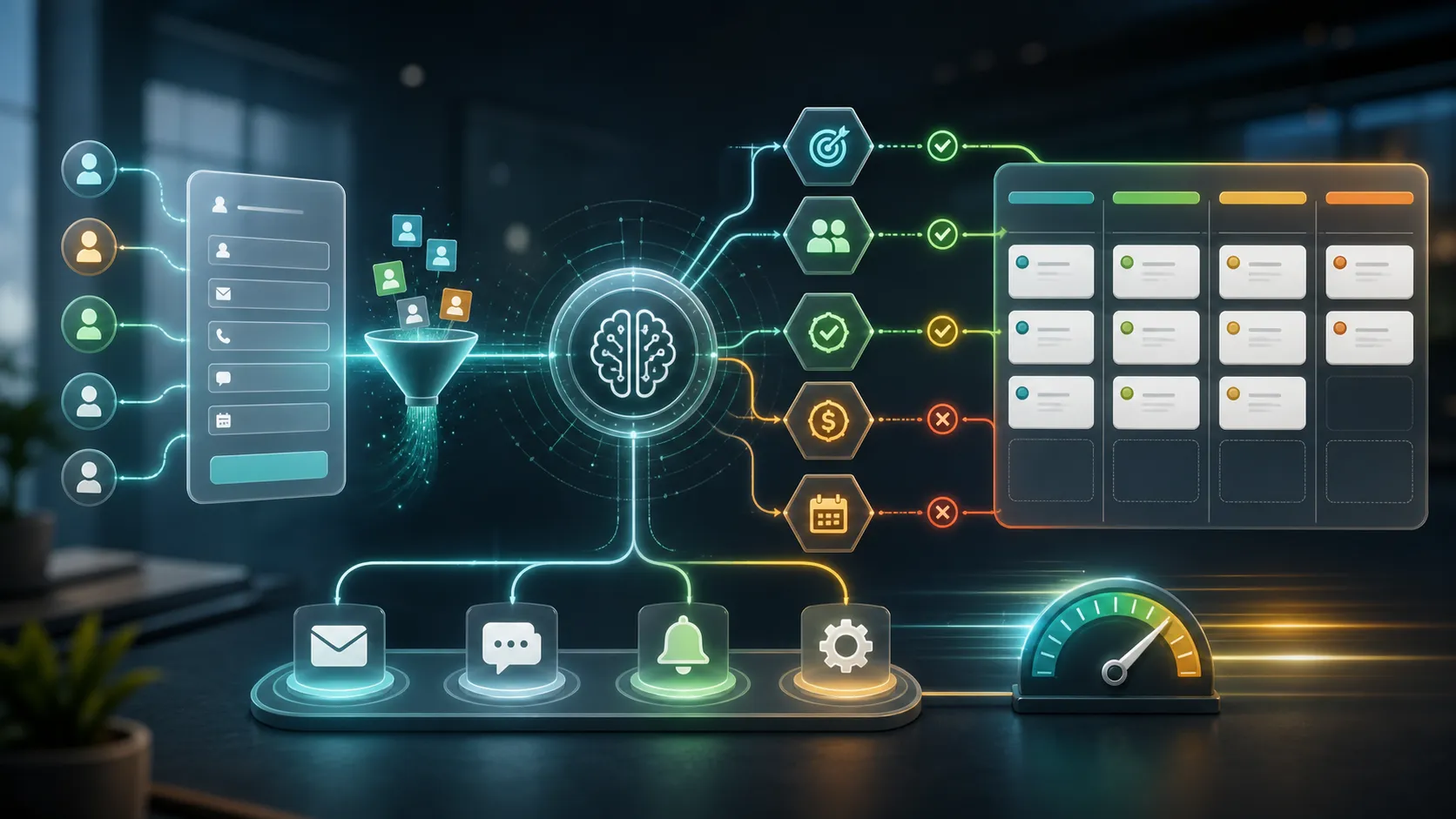
An AI lead qualification system is not just a chatbot. It is an operational workflow that captures inbound intent, understands messy prospect messages, scores fit, updates a CRM, and routes the next action to the right person or automation.
Quick answer: Build an AI lead qualification system by mapping the current lead flow, defining qualification rules, connecting website and messaging channels, grounding the AI in business data, routing outputs through a CRM, and preserving human escalation for uncertain or high-value cases.
The business value comes from speed, consistency, and context. Most inbound leads do not fail because the service is bad. They fail because response time is slow, source context is lost, CRM data is incomplete, and qualification depends on manual review.
Modern AI lead qualification fixes that by connecting the website, CRM, automation layer, and sales handoff into one system. The AI does not replace the sales process. It removes delay from the first few minutes of the buyer journey and gives the human team cleaner information when a conversation deserves attention.
What the Problem Really Means for a Business
For a service business, the gap between a submitted form and a meaningful response is a revenue leak. A prospect who fills out a form, sends a direct message, or opens a chat widget is usually comparing several providers at the same time. A five-minute response can feel like a modern buying experience. A same-day response can feel like silence.
The operational challenge is that a five-minute response time is difficult to maintain manually. Leads arrive after hours, on weekends, from multiple pages, and through channels that do not share the same context. A business owner or sales rep often has to decode an incomplete message, check whether the person is already in the CRM, decide whether the inquiry is a fit, and then write the first response.
An AI qualification system reduces that friction by handling the first layer of work immediately:
- Capture the source, message, service need, urgency, and contact details.
- Enrich the lead with available company, location, or CRM context.
- Ask only the missing questions.
- Score fit, urgency, and confidence.
- Push clean structured data into the CRM.
- Notify the right person or team.
- Draft, send, or queue the appropriate next response.

The goal is not to make every buying decision automatic. The goal is to stop qualified demand from waiting in an inbox, a spreadsheet, a contact form notification, or a generic transcript that no one reviews until the lead has gone cold.
Why Most Businesses Get This Wrong
Most failed implementations share the same pattern: the company installs a chat widget before designing the workflow.
That creates predictable problems:
| Failure | Result |
|---|---|
| No business objective | The bot chats but does not improve pipeline. |
| No CRM integration | Qualified data stays trapped in transcripts. |
| Too many required questions | Prospects abandon the conversation. |
| Generic model context | The bot gives vague or inaccurate answers. |
| No escalation rule | Complex leads get frustrated. |
| Heavy script loading | Core Web Vitals and SEO suffer. |
| No feedback loop | Scoring rules become stale after launch. |
The first mistake is treating AI as the objective. A business does not need “a chatbot.” It needs a measurable improvement in a workflow: faster response, fewer unqualified calls, cleaner CRM data, more after-hours bookings, or better routing between sales and support.
The second mistake is using a generic language model without business context. A model connected to a website can sound fluent while still misunderstanding pricing, service boundaries, delivery process, location coverage, qualification criteria, or brand voice. A revenue-facing system needs grounding in the business’s service pages, FAQs, policies, sales rules, CRM fields, and historical conversation patterns.
The third mistake is the “set and forget” approach. The first scoring model is a draft. Real prospects will use language the team did not expect. New services will be added. Sales will learn that certain signals matter more than expected. During the first quarter, transcripts, conversion quality, and closed-won outcomes should be reviewed regularly so the rules improve.
The fourth mistake is turning the chat interface into a long form. If the system asks for name, email, phone, company, budget, timeline, decision status, location, service need, and project details before offering value, it has recreated the friction it was supposed to remove. Effective systems use progressive profiling: capture a minimum viable contact point early, infer what can be inferred, and ask follow-up questions only when they change routing.
The final mistake is removing the human path. Human escalation is not a weakness. It is how the system handles high-value accounts, technical questions, sensitive situations, angry users, ambiguous requests, and low-confidence answers without damaging trust.
How to Diagnose the Existing Lead Flow
Before adding AI, map the current lead journey from first visit to sales action. Implementing automation on top of an unmeasured pipeline will only make the existing problems happen faster.
Start by measuring the exact time from lead capture to CRM entry. If a website form submission, email inquiry, or chat transcript takes more than a few minutes to become a clean CRM record with an owner, the business has a routing problem.
Then measure the time from lead capture to first meaningful response. “Meaningful” means the response acknowledges the prospect’s specific request and gives the next step. An autoresponder that says “we received your message” is not a qualified response.
The audit should also measure:
- Percentage of leads missing service, location, budget, urgency, or timeline.
- MQL-to-SQL conversion rate.
- Leads rejected because they were a bad fit.
- Leads lost because response was too slow.
- Pages, campaigns, and channels that generate the highest-intent inquiries.
- Chat or form fields where users abandon.
- Duplicate, stale, or incomplete CRM records.
If the site already uses a rule-based chatbot, inspect the drop-off points. Low engagement often means the opening prompt is generic. Low completion usually means the flow asks too many questions, asks them in the wrong order, or sounds like an interrogation instead of a helpful conversation.
This diagnosis should answer one question: is the real bottleneck capture, qualification, routing, response speed, CRM hygiene, or follow-up consistency?
What to Fix First
Fix the workflow before selecting the model. A stronger model will not rescue a broken intake process.
Start with data hygiene. The CRM should not contain duplicate contacts, inconsistent service names, missing owner assignments, or unclear lead stages. If the AI reads contradictory customer history, it will make inconsistent routing decisions.
Then choose one high-impact workflow instead of trying to automate the entire sales process. A good first version might focus on after-hours website inquiries, one high-value service page, or a specific lead type that currently takes too long to screen.
The first production version should have:
- One clear conversion goal.
- A short list of qualification fields.
- A known CRM destination.
- Clear owner assignment rules.
- Escalation rules for high-value or uncertain leads.
- A performance-safe loading pattern for the website.
- A reporting view for speed-to-lead and conversion quality.
Expanding to more channels, services, and edge cases comes later. A narrow system that reliably qualifies one or two high-value lead types is more useful than a broad system that touches every channel badly.
Core Architecture of an AI Workflow System
A production AI qualification system is fundamentally different from a standalone chatbot. It is an orchestrated workflow that turns unstructured messages into structured business actions.

1. Trigger capture
The trigger layer is the ingestion point. A trigger can be a website chat message, contact form submission, email, SMS, Facebook Messenger message, Instagram DM, paid landing page form, or calendar request.
The key design decision is normalization. Every channel should produce a consistent internal event shape so downstream logic does not need a separate workflow for every source.
At minimum, the event should include:
- Contact details.
- Raw message or transcript.
- Channel and source page.
- Campaign or referrer if available.
- Timestamp.
- Consent or privacy fields.
- Any known CRM identifier.
2. Signal and context
The AI should not reason from the message alone. It should receive context from the website, CRM, and marketing stack.
Useful context includes:
- Landing page and page topic.
- Referrer, campaign, and UTM parameters.
- Service page or local page viewed before conversion.
- Existing customer or prospect status.
- Previous conversations.
- Company domain and firmographic details.
- Known service area or location.
This context helps the system distinguish between a new buyer, an existing client needing support, a vendor pitch, a low-fit inquiry, and a high-value prospect.
3. AI reasoning and decision
The reasoning layer classifies the lead. It should identify what the person wants, which fields are missing, how urgent the request is, whether the request matches the business, and what should happen next.
Do not ask the model to “qualify the lead” in vague language. Give it explicit definitions for qualified, unqualified, urgent, uncertain, and human-review cases.
The output should be structured and deterministic. A free-text paragraph is hard for automation tools to parse. A structured output can include:
- Qualification status.
- Fit score.
- Urgency score.
- Confidence score.
- Missing fields.
- Recommended next action.
- Summary for the human owner.
- Reasoning notes or risk flags.
4. Workflow logic and orchestration
The orchestration layer connects the AI decision to the business systems. This can be a workflow platform, serverless function, backend job, or automation tool.
The orchestration layer should own conditional logic. The model can recommend a next action, but the workflow should enforce guardrails:
- Only book calls when required fields exist.
- Only send pricing language that is approved.
- Route high-value accounts to a human.
- Escalate low-confidence conversations.
- Retry failed CRM writes.
- Log all failures in a place the team reviews.
5. Action and execution
Once the lead is scored and routed, the system executes business actions:
- Create or update the CRM record.
- Assign an owner.
- Create a deal or opportunity.
- Send a personalized email.
- Send an SMS confirmation.
- Trigger a calendar booking flow.
- Post a Slack or email alert to the team.
- Add lower-fit leads to a nurture sequence.
- Create a task for manual follow-up.
The system should write structured fields into the CRM, not just dump a transcript into a note. Sales teams need clean fields for filtering, reporting, owner assignment, and follow-up.
6. Human control and learning
Human escalation is required for production reliability. The system should pause or hand off when:
- The confidence score is low.
- The user asks for a person.
- The conversation is sensitive or emotional.
- The prospect is high-value.
- The AI detects ambiguity.
- The next action has legal, financial, or reputational risk.
The system should also learn from outcomes. Closed-won and closed-lost data should feed future rule changes. If a signal repeatedly predicts good calls, increase its weight. If a lead source generates volume but not revenue, lower its priority.
Qualification Rules
Start with a narrow model. Define the fields the business actually needs to make a routing decision.
| Field | Example values |
|---|---|
| Service need | Website rebuild, SEO audit, AI chatbot, CRM automation |
| Business type | Local service, B2B service, ecommerce, SaaS |
| Location | Miami, Florida, remote, multi-location |
| Urgency | Immediate, this month, this quarter, research only |
| Budget fit | Below range, starter scope, implementation-ready |
| Decision status | Owner, manager, researcher, agency partner |
| Lead source | Organic search, paid ad, referral, AI search, direct |
| Existing status | New lead, customer, past prospect, support request |
| Next action | Book call, send audit, request more info, human review |
The AI can classify these fields, but the business should own the definitions. The system should know what “qualified” means for the actual offer, not for a generic sales textbook.
Routing by Confidence
Confidence thresholds keep automation useful without pretending every case is obvious.

A high-fit lead can receive a fast booking path and team alert. A medium-fit lead may need one or two follow-up questions. A low-fit lead can receive a polite redirect or resource. An uncertain lead should move into human review with the transcript and context intact.
Technical SEO Considerations: Core Web Vitals
AI qualification should not damage the site that creates the lead. A heavy chat widget can hurt performance, which can hurt search visibility and conversion.
Google’s Core Web Vitals measure real user experience. For this type of implementation, the main risks are Interaction to Next Paint, Largest Contentful Paint, and Cumulative Layout Shift.
Interaction to Next Paint
Interaction to Next Paint measures how responsive the page feels when a visitor clicks, taps, or types. Heavy chatbot scripts, personalization libraries, analytics tools, and client-side automation can block the browser’s main thread.
If the main thread is busy parsing and executing a large chat application, the page may feel broken when the user tries to open a menu, tap a button, or submit a form. This is especially risky on mobile devices with slower CPUs.
To protect responsiveness:
- Avoid loading the full assistant on initial page load.
- Break long JavaScript tasks into smaller chunks.
- Use event delegation instead of attaching unnecessary listeners.
- Debounce expensive interaction handlers.
- Move CPU-heavy work away from the main rendering path when possible.
- Initialize the AI interface only after the primary content is usable.
Largest Contentful Paint
Largest Contentful Paint measures how quickly the main visible content appears. The hero section, large heading, primary image, and server response are usually the biggest factors.
Chatbot scripts can damage LCP when they load synchronously in the page head, block rendering, delay fonts, or compete with the hero content for bandwidth and CPU. The lead system should support the page, not become the page’s performance bottleneck.
To protect LCP:
- Keep the page server-rendered.
- Load non-critical scripts with
async,defer, or interaction-based loading. - Prioritize the hero content and critical CSS.
- Avoid initializing personalization before the page is visible.
- Keep third-party scripts minimal on high-intent landing pages.
Cumulative Layout Shift
Cumulative Layout Shift measures unexpected movement while the page loads. Chat widgets, popups, banners, and embedded forms can create layout shifts if they inject themselves into the page without reserved space.
To protect visual stability:
- Reserve stable dimensions for embedded forms and widgets.
- Use predictable fixed positioning for floating chat triggers.
- Do not push content down after the user starts reading.
- Avoid late-loading banners that shift the layout.
- Test mobile placement so the widget does not hide navigation or CTAs.
Core Web Vitals are measured from real users, not only lab tests. Development teams should test with lab tools before launch, then monitor field data after launch so performance issues are caught before they damage organic traffic.
Website Development Considerations
The website integration should be treated as software architecture, not a plugin install. A reliable AI qualification system needs clean events, secure API boundaries, error handling, and a predictable fallback.
The most important frontend pattern is the facade pattern. Instead of loading the entire assistant immediately, the page renders a lightweight HTML and CSS trigger that looks like a chat entry point. The real JavaScript loads only after the user interacts.

Important implementation details include:
- A normalized event payload for every channel.
- A secure server-side endpoint for model and CRM operations.
- Rate limits and abuse controls.
- Strict validation for fields written to the CRM.
- Retries and alerts for failed CRM writes.
- Human-readable transcripts and structured summaries.
- Privacy language around automated qualification.
- Mobile testing on real devices, not only resized desktop windows.
The system should degrade gracefully. If the AI service, workflow tool, or CRM API is unavailable, the visitor should still be able to submit a form, request a call, or reach a human.
Conversion Considerations
The interface is the concierge for the sales process. A strong backend will not matter if the conversation makes the prospect feel interrogated.
The opening message should be timed and contextual. A generic “Hi, how can I help?” on every page is easy to ignore. A better prompt responds to user intent:
- On a pricing or service page: “I can help you figure out the right scope in two minutes. Want to start?”
- On a local service page: “I can check whether this service is a fit for your location and timeline.”
- On a technical article: “Want help turning this into a workflow for your business?”
Use progressive profiling. Ask the smallest number of questions needed to route the lead:
- What are you trying to improve or build?
- What is your timeline?
- What is the best email or phone number for next steps?
Additional fields should be conditional. If the visitor already mentioned they need a website rebuild, do not ask them to choose a service from a long menu. If the company domain is available, enrich firmographic details in the background instead of asking for every detail manually.
Quick replies can help when the answer should map cleanly into the CRM. Budget ranges, timeline options, and service categories are easier to route when the user can tap a choice. Open-ended text should still be available for context.
The first conversion milestone is not a perfect score. It is enough structured information to decide whether to book, nurture, redirect, or review.
AI Automation Opportunities: The Agentic Workflow
A mature system goes beyond form replacement. It can evaluate the lead, trigger workflows, notify teams, and create follow-up actions automatically.
One common architecture connects a conversational frontend to an orchestration layer through webhooks. The frontend captures the conversation. The webhook sends the transcript and metadata to the orchestration layer. The orchestration layer calls the model, parses the structured output, and routes actions into the CRM, calendar, email platform, or internal notification tool.
The model prompt should be designed for bounded decisions. It should evaluate:
- Ideal customer profile fit.
- Buying intent.
- Urgency.
- Missing fields.
- Service match.
- Risk or sensitivity.
- Recommended next step.
The model should return a predictable structured payload rather than an unpredictable paragraph. The workflow can then branch:
- High-fit lead: create CRM deal, assign owner, send booking link, alert sales.
- Medium-fit lead: ask one clarifying question, send a relevant resource, add nurture tag.
- Low-fit lead: send a polite redirect or self-serve resource.
- Uncertain lead: route transcript to human review.
These automations should run behind approval gates when the action is sensitive, expensive, or customer-facing. The AI can draft a follow-up, but the system should decide whether that draft can be sent automatically or needs review.
The learning loop matters. A lead score is only useful if it correlates with booked calls and revenue. Feed closed-won and closed-lost outcomes back into the scoring rules so the system learns from actual business results instead of lead volume alone.
How This Connects to GEO, AEO, and AI Search
The best qualification system starts before the chat. The business needs high-intent traffic, and search behavior is shifting from traditional link results toward AI-generated answers from tools like ChatGPT, Perplexity, Gemini, and Google’s AI experiences.
Traditional SEO focuses on ranking pages for searches. Generative Engine Optimization and Answer Engine Optimization focus on making content easy for AI systems to understand, synthesize, and cite.
This matters for lead qualification because traffic from an AI answer can be highly informed. The visitor may arrive after asking a detailed question such as “who can build an AI lead qualification workflow for a local service business?” If the page they land on preserves topic and source context, the qualification system can start with a much better understanding of intent.
A useful GEO and AEO foundation includes:
- Service pages that explain exact offers.
- FAQ content that answers buyer questions directly.
- Articles that explain implementation concepts clearly.
- Local pages that clarify service areas.
- Schema that describes the business, services, FAQs, and breadcrumbs.
- Content that uses clear headings, definitions, and steps.
- Lead flows that preserve landing page and query context.
The full system becomes a closed loop. External AI search engines help send targeted demand to the website. The website captures the source and topic. The internal AI qualification system uses that context to score, route, and follow up with the prospect.
How I Would Approach This for a Service Business
For a service business, I would treat the website as an active revenue system, not a static brochure. The work starts by mapping how a lead moves from page visit to booked call and identifying where prospects slow down, disappear, or enter the CRM with missing information.
The first implementation should focus on the highest-value inquiry path. That might be one core service, one location, one landing page, or one after-hours lead flow. The narrower the first version, the easier it is to test and improve.
My implementation path would be:
- Audit the current lead flow, response time, CRM fields, and conversion drop-off.
- Define what makes a lead qualified, unqualified, urgent, or uncertain.
- Clean the CRM fields the AI will read from or write to.
- Build a lightweight website entry point that does not hurt Core Web Vitals.
- Connect the assistant to a secure server-side workflow.
- Ground the AI in service, FAQ, pricing, process, and escalation context.
- Write structured CRM records instead of transcript-only notes.
- Add owner alerts for high-fit or urgent inquiries.
- Add a human review lane for low-confidence conversations.
- Review transcripts and outcomes weekly during the first month.
For this site, the relevant services connect directly to AI automation, website development, and SEO/GEO growth. The strongest version combines all three: a fast website, structured content for AI search visibility, and an automation workflow that turns inbound demand into cleaner pipeline.
Mistakes to Avoid
In the pursuit of automation, businesses often make the same structural mistakes.
| Category | Common mistake | Technical consequence | Corrective action |
|---|---|---|---|
| Strategy | Deploying AI without a clear business goal | The system chats but does not improve speed-to-lead, support load, or qualified pipeline | Define explicit KPIs before writing prompts or installing tools |
| UX and design | Asking too many questions upfront | Prospects abandon the flow before qualification is complete | Use progressive profiling and keep required questions short |
| AI tuning | Relying on a generic model | The AI gives vague answers or misunderstands service details | Ground the model in service pages, FAQs, CRM data, and approved policies |
| Architecture | No human escalation path | High-value or frustrated prospects get trapped in automation | Use confidence thresholds and route context to a live person |
| Technical SEO | Loading chatbot scripts synchronously | Main-thread blocking hurts INP, LCP, and organic performance | Use a facade pattern and asynchronous loading |
| Maintenance | Treating launch as the finish line | Scoring rules become stale as the market and offers change | Review transcripts and conversion outcomes regularly |
Practical Checklist for Implementation
| Phase | Critical action items |
|---|---|
| Diagnostic and data prep | Map the current time from traffic acquisition to CRM entry. Clean duplicate CRM records. Define the ideal customer profile and required fields. |
| Architecture selection | Choose the frontend intake pattern, orchestration layer, model provider, CRM destination, and structured output format. |
| Technical SEO optimization | Use a facade pattern for the assistant. Keep INP and LCP targets in mind. Reserve space for any dynamic UI. |
| Logic configuration | Build secure webhooks. Add confidence thresholds. Route high-fit, medium-fit, low-fit, and uncertain leads differently. |
| Launch and iteration | Start with one controlled workflow. Review transcripts. Adjust scoring based on booked calls and closed-won revenue. |
Final Recommendation
Building an AI lead qualification system requires software engineering, technical SEO, and operational strategy working together. A generic chatbot can create the appearance of automation while leaving the real pipeline unchanged. A properly architected system captures intent instantly, enriches context, scores fit, updates business tools, protects website performance, and keeps humans in control where judgment matters.
For service businesses, the goal is not to automate every conversation. The goal is to remove delay, reduce manual sorting, preserve context, and help the right prospects reach the right next step faster.
Works Cited
- What Is an AI Workflow System? Architecture, Use Cases, and Examples
- AI Lead Qualification System Case Study
- Google Core Web Vitals Explained
- A Comprehensive Guide to B2B Generative Engine Optimization
- Top AEO and AI Search Monitoring Tools
- How Do Chatbots Qualify Leads?
- AI for Real Estate: Automate Lead Qualification and Follow-Up
- How Agentic AI Improves Lead Qualification
- 5 Common AI Chatbot Implementation Mistakes
- 15 Chatbot Mistakes That Kill Conversions
- AI Chatbots for Lead Generation: The Ultimate Sales Guide
- How to Audit Your Entire Lead Flow End-to-End
- Core Web Vitals: The Complete Guide to Optimizing Speed and User Experience
- Core Web Vitals: What Is INP and How Can It Be Improved?
- Core Web Vitals in 2026: The Complete Guide to Faster Rankings
- AEO/GEO Core Concepts
- Best Generative Engine Optimization Tools for AI in 2026
- The Search Impact System: SEO + GEO for Modern Lead Generation